Introduction
Welcome to the world of Python programming!
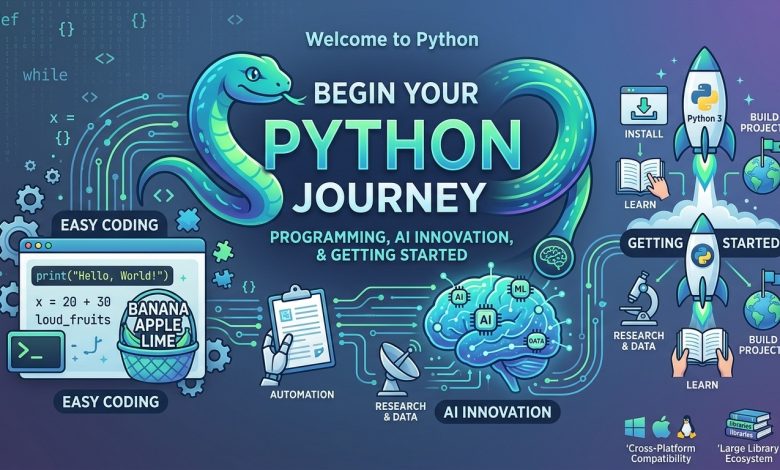
Whether you are completely new to coding or already have experience with another programming language, Python is an excellent place to start your development journey. Its clean syntax, flexible structure, and extensive collection of libraries make it one of the most accessible and widely used programming languages.
Today, Python is used in many areas of technology, including web development, artificial intelligence, machine learning, data science, automation, scientific research, cybersecurity, and software engineering.


One of the biggest reasons behind Python’s popularity is that it allows developers to write understandable code without dealing with unnecessary complexity.
For example, imagine you have a list of fruits and want to convert every fruit name into uppercase letters. In Python, you can complete this task with just one line of code using a feature called a list comprehension.
python
fruits = ['Banana', 'Apple', 'Lime']

loud_fruits = [fruit.upper() for fruit in fruits]

print(loud_fruits)
Output:
text
['BANANA', 'APPLE', 'LIME']
Another useful Python feature is the built-in enumerate() function, which allows you to access both the position and value of items inside an iterable.
python
fruits = ['Banana', 'Apple', 'Lime']

print(list(enumerate(fruits)))
Output:
text
[(0, 'Banana'), (1, 'Apple'), (2, 'Lime')]
These examples demonstrate why Python is so popular among beginners and experienced developers.
But Python is much more than a simple programming language. It has become an important technology behind modern AI applications, intelligent automation systems, data-driven platforms, and innovative digital products.
In this guide, we will explore what Python is, how to get started, how list comprehensions and enumerate work, and how you can use Python to begin your journey into artificial intelligence.
We will also cover practical examples, essential programming concepts, AI development tools, beginner projects, and useful learning resources.
What Is Python Programming?
Python is a high-level, general-purpose programming language designed to make software development easier and more productive.
It was created by Guido van Rossum and first released in 1991. Since then, Python has grown into a major programming language supported by a large international developer community.
Python emphasizes readability and simplicity. Its syntax is designed to make programs easier to understand, write, and maintain.
Unlike some programming languages that require extensive declarations and complicated syntax, Python allows developers to express many operations using relatively few lines of code.
For example, displaying a message is as simple as:
python
print("Hello, World!")
You can also perform calculations directly:
python
first_number = 20
second_number = 30

result = first_number + second_number

print(result)
Output:
text
50
Python is also an interpreted language, which means developers can run Python programs through an interpreter without manually compiling every program into a traditional executable file.
Why Is Python So Popular?
There are several reasons why developers choose Python.
Easy-to-read syntax: Python code is generally straightforward, making it easier for beginners to understand programming concepts.
Large library ecosystem: Python provides a rich standard library and thousands of third-party packages for different development tasks.
Cross-platform compatibility: Python runs on Windows, macOS, Linux, and other supported environments.
AI and machine learning support: Popular libraries such as PyTorch, TensorFlow, and scikit-learn make Python an important language for AI development.
Automation capabilities: Developers can use Python to automate repetitive activities, process files, collect data, and manage workflows.
Strong community: Python has an extensive developer community that provides tutorials, documentation, open-source projects, and technical support.
These characteristics make Python a practical choice for both beginners and professional developers.
Python 3: Understanding the Modern Python Environment
Python 3 is the modern version of the Python programming language.
Python 2 has reached the end of its official support lifecycle, so new learners should focus on Python 3 rather than starting with outdated Python 2 tutorials.
Python continues to evolve through regular releases, improvements, and new language features.
As of November 2026, Python.org lists Python 3.15.2 as the latest released version. Developers should always check the official download page for the latest stable release and compatibility information.
The official documentation provides information about different Python versions, language features, standard libraries, and installation instructions.
Python 3 supports many useful programming features, including:
- List comprehensions.
- Dictionaries and sets.
- Functions and modules.
- Object-oriented programming.
- Exception handling.
- Iterators and generators.
- Asynchronous programming.
- Type annotations.
- Modern string formatting.
Understanding these features will help you write cleaner and more efficient programs.
How to Get Started With Python
Starting with Python does not require an expensive computer or complicated development environment.
You only need a supported computer, a Python installation, and a code editor or development environment.
Here is a simple process for getting started.
Step 1: Download Python
Visit the official Python website:
Choose the appropriate installer for your operating system.
Python supports major desktop platforms, including Windows, macOS, and Linux.
Download a supported stable release and follow the installation instructions.
On Windows, make sure Python is added to your PATH during installation if the installer provides that option.
Step 2: Verify Your Installation
After installation, open your terminal or command prompt.
Run:
bash
python --version
Depending on your operating system, you may need:
bash
python3 --version
The terminal should display your installed Python version.
If the command is not recognized, check whether Python was installed correctly and whether its executable location is available in your system PATH.
Step 3: Choose a Code Editor
You can write Python programs using a basic text editor, but a development environment makes coding more comfortable.
Some popular options include:
- Visual Studio Code.
- PyCharm.
- IDLE.
- JupyterLab.
- Thonny.
Beginners may find Thonny or IDLE particularly approachable, while Visual Studio Code and PyCharm offer additional development features.
Step 4: Write Your First Python Program
Create a file named:
hello.py
Add the following code:
python
print("Welcome to Python!")
print("My programming journey starts today.")
Save the file and run it from your terminal:
bash
python hello.py
Output:
text
Welcome to Python!
My programming journey starts today.
Congratulations! You have written and executed your first Python program.
Step 5: Explore Python’s Interactive Shell
Python also provides an interactive environment called the REPL.
REPL stands for Read-Eval-Print Loop.
It allows you to enter Python expressions and immediately see their results.
For example:
python
>>> 10 + 5
15

>>> 20 * 3
60

>>> "Python".upper()
'PYTHON'
This environment is especially useful when learning new programming concepts or testing small pieces of code.
Understanding Python List Comprehensions
List comprehensions are one of Python’s most useful features.
They provide a concise way to create new lists from existing iterables.
Instead of writing a complete loop and manually appending items to a list, you can often accomplish the same task using a single expression.
This makes code shorter and, when used appropriately, easier to read.
What Is a List Comprehension?
A list comprehension is a compact way of creating a list based on an iterable, such as another list, tuple, or range.
The general syntax is:
python
new_list = [expression for item in iterable]
Here is what each part means:
expression: The operation performed on each item.item: The current element being processed.iterable: The collection being examined.
Example 1: Convert Fruit Names to Uppercase
Let’s use the original Python.org example.
python
fruits = ['Banana', 'Apple', 'Lime']

loud_fruits = [fruit.upper() for fruit in fruits]

print(loud_fruits)
Output:
text
['BANANA', 'APPLE', 'LIME']
The expression processes every item in the fruits list and converts its text into uppercase.
There is no need to write a separate append statement.
Example 2: Create a List of Squares
Suppose you want to calculate the square of numbers from 1 to 5.
python
numbers = [1, 2, 3, 4, 5]

squares = [number ** 2 for number in numbers]

print(squares)
Output:
text
[1, 4, 9, 16, 25]
The expression number ** 2 calculates the square of each number.
Example 3: Filter Even Numbers
List comprehensions can also include conditional statements.
python
numbers = [1, 2, 3, 4, 5, 6, 7, 8]

even_numbers = [
    number for number in numbers
    if number % 2 == 0
]

print(even_numbers)
Output:
text
[2, 4, 6, 8]
The condition checks whether each number is divisible by two.
Only numbers that satisfy the condition are included in the resulting list.
Example 4: Extract Names From a List
python
users = [
    "Alice",
    "John",
    "Michael",
    "Sarah"
]

names = [user for user in users if len(user) > 4]

print(names)
Output:
text
['Alice', 'Michael', 'Sarah']
This example selects names containing more than four characters.
Example 5: Work With Multiple Lists
You can also use nested loops inside list comprehensions.
python
colors = ["Red", "Blue"]

sizes = ["Small", "Large"]

combinations = [
    (color, size)
    for color in colors
    for size in sizes
]

print(combinations)
Output:
text
[
    ('Red', 'Small'),
    ('Red', 'Large'),
    ('Blue', 'Small'),
    ('Blue', 'Large')
]
This approach is useful when generating combinations of values.
List Comprehension vs Traditional For Loop
Both approaches can produce the same result.
Traditional loop:
python
numbers = [1, 2, 3, 4, 5]

squares = []

for number in numbers:
    squares.append(number ** 2)

print(squares)
List comprehension:
python
numbers = [1, 2, 3, 4, 5]

squares = [number ** 2 for number in numbers]

print(squares)
The second example is shorter and convenient for simple transformations.
However, traditional loops are sometimes easier to understand when processing involves multiple operations or complicated conditions.
Good Python code prioritizes readability rather than trying to compress everything into one line.
Python enumerate(): Access Index and Value Together
Another useful Python feature is the built-in enumerate() function.
When working with lists, developers sometimes need to access both the current item’s value and its position.
A traditional loop can do this using a counter variable.
However, Python provides a cleaner solution through enumerate.
What Does enumerate() Do?
The enumerate() function adds a counter to an iterable and returns an enumerate object containing index-value pairs.
The basic syntax is:
python
enumerate(iterable, start=0)
The iterable parameter represents the collection being processed.
The optional start parameter determines the starting index.
By default, counting begins at zero.
Example 1: Enumerate a Fruit List
python
fruits = ['Banana', 'Apple', 'Lime']

for index, fruit in enumerate(fruits):
    print(index, fruit)
Output:
text
0 Banana
1 Apple
2 Lime
The first variable receives the index, while the second receives the corresponding fruit name.
Example 2: Convert Enumerate Into a List
The original Python.org example uses:
python
fruits = ['Banana', 'Apple', 'Lime']

print(list(enumerate(fruits)))
Output:
text
[(0, 'Banana'), (1, 'Apple'), (2, 'Lime')]
The list() function converts the enumerate object into a list of tuples.
Each tuple contains an index and its associated value.
Example 3: Start Counting From One
Sometimes you want numbering to begin at one rather than zero.
You can use the start parameter.
python
fruits = ['Banana', 'Apple', 'Lime']

for index, fruit in enumerate(fruits, start=1):
    print(index, fruit)
Output:
text
1 Banana
2 Apple
3 Lime
This is useful when displaying numbered lists, ranking items, or generating reports.
Example 4: Create a Numbered Shopping List
python
shopping_items = [
    "Milk",
    "Bread",
    "Eggs",
    "Rice"
]

for number, item in enumerate(shopping_items, start=1):
    print(f"{number}. {item}")
Output:
text
1. Milk
2. Bread
3. Eggs
4. Rice
This example demonstrates a practical use of enumerate in everyday programming.
Example 5: Find the Position of a Specific Item
python
fruits = ['Banana', 'Apple', 'Lime']

for index, fruit in enumerate(fruits):

    if fruit == "Apple":

        print(f"Apple found at index {index}")
Output:
text
Apple found at index 1
This technique can be useful when searching through collections while keeping track of element positions.
Python List Comprehensions and enumerate Together
List comprehensions and enumerate are especially useful when combined.
Imagine that you want to create a list containing the positions and names of all fruits.
You can write:
python
fruits = ['Banana', 'Apple', 'Lime']

fruit_positions = [
    (index, fruit)
    for index, fruit in enumerate(fruits)
]

print(fruit_positions)
Output:
text
[(0, 'Banana'), (1, 'Apple'), (2, 'Lime')]
You can also filter the results.
python
fruits = ['Banana', 'Apple', 'Lime', 'Orange']

selected_fruits = [
    (index, fruit)
    for index, fruit in enumerate(fruits)
    if len(fruit) > 4
]

print(selected_fruits)
Output:
text
[(0, 'Banana'), (1, 'Apple'), (3, 'Orange')]
This combines indexing, filtering, and list creation in a readable expression.
These techniques are useful in data processing, automation, report generation, and many other Python applications.
Python and Artificial Intelligence: Why They Work So Well Together
Python has become one of the leading programming languages for artificial intelligence.
AI development involves working with data, mathematical operations, machine learning algorithms, neural networks, and external services.
Python has an extensive ecosystem of libraries that help developers work with these technologies.
Its straightforward syntax also makes experimentation easier.
1. Machine Learning
Machine learning allows computer systems to identify patterns in data and make predictions based on learned information.
Python provides several libraries for machine learning.
Scikit-learn: A widely used library for classification, regression, clustering, and data preprocessing.
PyTorch: A machine learning framework commonly used for deep learning research and development.
TensorFlow: A platform for developing and deploying machine learning applications.
These tools allow developers to build models without implementing every mathematical operation from scratch.
2. Generative AI
Generative AI systems can create new content based on patterns learned from training data.
Examples include:
- Text generation.
- Image generation.
- Code assistance.
- Document summarization.
- Conversational applications.
- Data extraction.
Python is frequently used to connect applications with AI models and external APIs.
For example, a developer can build a chatbot that receives a question, sends it to an AI service, and returns the generated response.
3. Data Science
AI systems depend heavily on data.
Python provides powerful libraries for collecting, cleaning, analyzing, and visualizing information.
Some important tools include:
- NumPy for numerical computing.
- Pandas for data analysis.
- Matplotlib for visualization.
- Seaborn for statistical graphics.
- JupyterLab for interactive computing.
Learning these libraries can help you move from basic Python programming toward practical AI and data science work.
4. Automation and AI Agents
Python can also be used to automate repetitive tasks.
For example, developers can create systems that:
- Organize files.
- Process spreadsheets.
- Generate reports.
- Read documents.
- Connect different APIs.
- Monitor data.
- Execute predefined workflows.
When combined with AI models, Python can support more advanced systems that interpret information and choose actions within carefully defined workflows.
AI-First Learning: How to Start Python With Artificial Intelligence
If your goal is to enter the AI industry, learning Python is an excellent starting point.
However, jumping directly into advanced AI frameworks without understanding programming fundamentals can make learning unnecessarily difficult.
A better approach is to build your skills gradually.
Step 1: Learn Basic Python Syntax
Start with the fundamental building blocks:
- Variables.
- Data types.
- Strings.
- Numbers.
- Lists.
- Tuples.
- Dictionaries.
- Sets.
- Conditional statements.
- For and while loops.
These concepts are essential for almost every Python application.
Step 2: Understand Functions
Functions allow you to organize reusable code.
Example:
python
def greet_user(name):

    return f"Hello, {name}!"

message = greet_user("Alex")

print(message)
Output:
text
Hello, Alex!
Functions become particularly important when building larger applications.
Step 3: Learn Data Structures
Focus on lists, dictionaries, tuples, and sets.
Pay special attention to list comprehensions and enumerate because they are frequently useful when processing collections.
Step 4: Learn Essential Python Libraries
Once you understand the fundamentals, start exploring libraries.
A useful learning sequence is:
- NumPy.
- Pandas.
- Matplotlib.
- Requests.
- Scikit-learn.
- PyTorch or TensorFlow.
You do not need to master every library immediately.
Choose tools based on the type of projects you want to build.
Step 5: Understand Basic Mathematics and Statistics
AI development often involves mathematical concepts.
Some useful topics include:
- Algebra.
- Statistics.
- Probability.
- Functions.
- Vectors.
- Matrices.
- Basic calculus.
You do not need to become a mathematician before starting Python, but learning these subjects gradually will help you understand machine learning more deeply.
Step 6: Build Your First AI Project
Start with something small.
For example, create a basic sentiment analysis program that classifies text as positive or negative using an existing machine learning library.
Another option is to build a simple chatbot using an AI API.
The goal is to connect your Python knowledge with a practical application.
Using AI Coding Assistants to Learn Python Faster
AI-powered coding assistants have introduced a new way to learn programming.
Instead of searching through multiple tutorials whenever you encounter an unfamiliar concept, you can ask an AI assistant to explain the code directly.
However, the best results come from using AI as a learning partner rather than allowing it to write everything for you.
Here are some practical ways to use AI during your Python learning journey.
1. Ask AI to Explain Code
For example, you can provide this code:
python
numbers = [1, 2, 3, 4, 5]

squares = [n ** 2 for n in numbers]
Then ask:
“Explain this Python list comprehension line by line using beginner-friendly language.”
The assistant can explain how the loop processes each item and how the resulting list is created.
2. Generate Practice Exercises
Ask an AI tool to create beginner-level Python exercises covering lists, loops, functions, and dictionaries.
You can request hints without immediately seeing the complete solution.
This encourages independent problem-solving.
3. Debug Python Errors
Suppose you receive an error while running a program.
You can share the relevant code and error message with an AI assistant and ask it to explain the possible cause.
However, never assume that the first suggested solution is always correct. Test the changes and understand why they work.
4. Build Projects With AI Guidance
You can use AI to plan and develop small Python applications.
For example:
- A personal expense tracker.
- A file organization tool.
- A weather information application.
- A simple chatbot.
- A CSV data analyzer.
- A document summarizer.
Start by understanding the requirements and building the application one feature at a time.
5. Learn Responsible AI Development
AI-generated code can contain errors, outdated approaches, or security weaknesses.
Always review code before running it, particularly when it handles private information, files, credentials, or external services.
Avoid sharing passwords, API keys, and confidential information with AI tools.
Learning how to verify AI-generated code is an important skill for modern developers.
Practical Python Projects for Beginners
The best way to improve your programming ability is to build projects.
Here are several ideas that combine basic Python concepts with real-world applications.
Project 1: Fruit List Converter
Use list comprehensions to convert fruit names into uppercase.
python
fruits = ["banana", "apple", "lime"]

uppercase_fruits = [fruit.upper() for fruit in fruits]

print(uppercase_fruits)
Skills learned: lists, strings, list comprehensions.
Project 2: Student Marks Calculator
Calculate the average score of a student.
python
marks = [85, 90, 78, 92, 88]

average = sum(marks) / len(marks)

print("Average score:", average)
Skills learned: lists, built-in functions, arithmetic.
Project 3: Numbered Task Manager
Create a numbered list of tasks using enumerate.
python
tasks = [
    "Study Python",
    "Practice coding",
    "Build a project"
]

for number, task in enumerate(tasks, start=1):

    print(f"{number}. {task}")
Skills learned: loops, enumerate, formatted strings.
Project 4: Simple Password Generator
Use Python’s standard library to generate a random password.
python
import secrets
import string

characters = string.ascii_letters + string.digits

password = ''.join(
    secrets.choice(characters)
    for _ in range(12)
)

print(password)
Skills learned: modules, strings, iteration, secure random selection.
Project 5: Basic AI Text Classifier
Once you understand the Python fundamentals, explore text classification using scikit-learn.
You can begin with a small dataset containing positive and negative sentences.
Train a simple model and test how it classifies new text.
This introduces important machine learning concepts such as training data, features, predictions, and model evaluation.
A 30-Day Python and AI Learning Roadmap
A structured learning plan can make it easier to stay consistent.
Here is a practical beginner roadmap.
Week 1: Python Fundamentals
Learn:
- Installing Python.
- Writing your first program.
- Variables and data types.
- Strings and numbers.
- Lists and dictionaries.
- Basic operators.
Goal: Write small programs independently.
Week 2: Core Python Programming
Learn:
- If and else statements.
- For and while loops.
- Functions.
- List comprehensions.
- enumerate().
- Tuples and sets.
- Basic exception handling.
Goal: Understand how to process and organize data.
Week 3: Practical Python Development
Learn:
- Working with files.
- Importing modules.
- Using pip.
- Installing external packages.
- Understanding virtual environments.
- Working with APIs.
- Basic data analysis.
Goal: Build a small practical application.
Week 4: Introduction to AI
Learn:
- What artificial intelligence means.
- Machine learning fundamentals.
- Data preprocessing.
- Basic statistics.
- Introduction to NumPy and Pandas.
- Using an existing AI API.
- Building a simple AI-powered project.
Goal: Complete your first Python-based AI experiment.
Remember that 30 days is a starting roadmap, not a promise of professional-level expertise. Programming skills develop through continuous practice.
Python Learning Resources and Official References
When learning Python, it is important to use reliable documentation.
Official resources help you understand the language accurately and avoid outdated programming practices.
Here are some useful references.
1. Python Official Website
The main website provides downloads, documentation, community information, news, and learning resources.
2. Python Documentation
The official documentation covers Python syntax, built-in functions, standard libraries, and language features.
3. Python Tutorial
A structured introduction to Python programming, including lists, loops, functions, modules, and data structures.
4. Python Downloads
Use this page to find official Python installers and supported releases.
5. Python for Beginners
A useful starting point for people who are completely new to programming.
6. Python Beginner Guide
A collection of beginner-friendly learning resources, exercises, and project ideas.
7. Python Package Index (PyPI)
Explore and install third-party Python packages for different development requirements.
8. NumPy Documentation
Learn numerical computing and working with arrays.
9. Pandas Documentation
Explore data analysis and data manipulation using Python.
10. PyTorch Documentation
Learn about deep learning and modern machine learning development.
Common Mistakes Beginners Should Avoid
Learning Python becomes easier when you understand common mistakes before they become habits.
1. Memorizing Code Without Understanding It
Copying examples may help you get started, but it does not build strong programming skills.
Always try to understand what each line does.
2. Skipping Python Fundamentals
Do not jump directly into AI libraries without understanding variables, loops, functions, and data structures.
These fundamentals are used throughout Python development.
3. Writing Overly Complicated List Comprehensions
List comprehensions are useful, but complicated expressions can become difficult to read.
Use traditional loops when they make your code clearer.
4. Forgetting Zero-Based Indexing
Python sequences generally start at index zero.
For example, the first item in a list has index 0 rather than index 1.
Remember that enumerate also starts counting from zero by default.
5. Ignoring Error Messages
Python error messages often provide valuable information about what went wrong.
Read them carefully rather than immediately replacing the code.
6. Depending Completely on AI
AI tools can accelerate learning, but they cannot replace your understanding of programming.
Write your own code, test different approaches, and learn how to debug problems independently.
Frequently Asked Questions (FAQs)
1. Is Python suitable for complete beginners?
Yes. Python has readable syntax and a large learning community, making it a popular choice for people starting their programming journey.
2. What is the latest Python version?
As of November 2026, Python.org lists Python 3.15.2 as the latest released version. Always check the official downloads page for current releases.
3. What is a Python list comprehension?
A list comprehension is a concise way to create a new list by processing elements from an iterable.
For example:
python
numbers = [1, 2, 3, 4]

squares = [n ** 2 for n in numbers]

print(squares)
4. What does enumerate() do in Python?
The enumerate() function returns an iterator that provides both an index and a value for each item in an iterable.
5. Why does enumerate start at zero?
Python uses zero-based indexing for common sequence types. The enumerate() function follows this convention by default, although you can change the starting value.
6. Can Python be used for artificial intelligence?
Yes. Python is widely used in AI, machine learning, deep learning, natural language processing, and generative AI development.
7. Which Python libraries should beginners learn?
Start with the standard library and gradually explore NumPy, Pandas, Matplotlib, and scikit-learn. Later, consider PyTorch or TensorFlow if you want to work with deep learning.
8. Can I learn Python using AI tools?
Yes. AI assistants can explain code, create exercises, suggest projects, and help debug errors. You should still verify and understand the generated solutions.
9. How long does it take to learn Python?
Basic Python concepts can be learned within several weeks of consistent practice. Becoming comfortable with real-world development takes longer and depends on your learning schedule and project experience.
10. Do I need advanced mathematics to start Python?
No. Basic arithmetic and logical thinking are enough to begin. More advanced mathematics becomes useful when studying machine learning, data science, and deep learning.
11. Can Python create websites?
Yes. Python supports web development through frameworks such as Django, Flask, and FastAPI.
12. Is Python useful for future technology careers?
Python is used across many technology fields, including software engineering, AI, data science, automation, and backend development. Learning it can provide a useful foundation for exploring these career paths.
Conclusion
Python has developed into one of the most versatile programming languages in modern technology.
Its simple syntax, powerful built-in features, extensive libraries, and strong developer community make it an excellent choice for beginners and experienced programmers alike.
Features such as list comprehensions and enumerate demonstrate how Python makes everyday programming tasks easier and more readable.
At the same time, Python’s extensive AI ecosystem creates opportunities for developers interested in machine learning, generative AI, automation, and intelligent applications.
If you are just starting, focus on understanding the fundamentals. Learn how variables, loops, functions, lists, and dictionaries work before moving into more advanced topics.
Use official documentation, experiment with practical examples, and build small projects that solve real problems.
You can also use AI-powered coding assistants to explain unfamiliar concepts and improve your development workflow, but always make sure you understand and test the code yourself.
The journey from writing your first Hello World program to building an intelligent AI-powered application starts with small steps.
Start learning Python today, practice consistently, and turn your ideas into working software.