
Introduction
Imagine visiting a website where every time you click a button, search for a product, submit a form, or request new information, the entire webpage reloads. It would quickly become frustrating, wouldn’t it?
Modern websites are designed to provide a much smoother experience. Users expect information to appear quickly, search results to update instantly, and interactive features to work without interrupting the entire browsing session.
This is where AJAX becomes important.


AJAX is a web development technique that allows JavaScript to communicate with a server in the background and update specific parts of a webpage without requiring a complete page reload.
For example, when you search for something on an online store, the website can request matching products from its server and display the results while keeping the rest of the page unchanged.
Similarly, AJAX can be used for contact forms, weather applications, social media feeds, shopping carts, dashboards, and many other interactive features.
Although AJAX originally became popular through the XMLHttpRequest object, modern developers also use the JavaScript Fetch API to communicate with web servers.
In addition, JSON has become one of the most common data formats used in modern web applications.
If you are learning JavaScript or planning to become a frontend developer, understanding AJAX is an important step toward building interactive websites.
In this complete beginner-friendly guide, you will learn what AJAX means, how it works, how to use XMLHttpRequest and Fetch, how JSON responses are handled, and how to build practical AJAX applications.
We will also explore how artificial intelligence is changing the way developers learn AJAX and build modern web applications.
What Is AJAX?
AJAX stands for Asynchronous JavaScript and XML.
It is not a programming language, framework, or standalone technology. Instead, AJAX is a technique that combines JavaScript and browser capabilities to exchange information with a web server asynchronously.
The main purpose of AJAX is to allow a webpage to request or send information without refreshing the entire document.
Traditionally, many websites relied on complete page reloads whenever users requested new information.
For example, submitting a form might send the browser to another page or reload the current page to display the server response.
AJAX introduced a more flexible approach.
JavaScript can send a request to a server, receive the response, and update a particular HTML element without replacing the entire webpage.
What Can You Do With AJAX?
AJAX makes several common web development tasks easier.
- Update a webpage without reloading the entire page.
- Request information from a server after the webpage has loaded.
- Receive server responses in the background.
- Send information to a server without interrupting the user.
- Display dynamic search results.
- Submit forms asynchronously.
- Load additional content when users scroll.
- Refresh dashboard information.
- Build interactive applications.
For example, imagine a weather website.
A visitor enters a postal code and clicks a button. JavaScript sends the postal code to a weather API. The server processes the request and returns weather information.
The browser then updates the temperature section without reloading the entire webpage.
That is a practical example of AJAX.
Understanding the Technologies Behind AJAX
AJAX does not work through a single programming language or object. It combines several browser and web technologies.
Understanding these technologies will help you understand how AJAX applications communicate with servers.
1. JavaScript
JavaScript is responsible for sending requests, processing responses, and controlling what happens when new information arrives.
It also handles user interactions, such as button clicks, form submissions, and search input.
2. XMLHttpRequest
XMLHttpRequest is a browser-provided JavaScript object that allows applications to communicate with web servers.
It is one of the traditional technologies used to implement AJAX.
Developers can create an XMLHttpRequest object, configure a request, send it to a server, and process the returned information.
3. HTML DOM
The Document Object Model (DOM) represents the structure of an HTML document.
JavaScript uses the DOM to access and modify webpage elements.
For example, if a server returns a new message, JavaScript can update a paragraph or content section using DOM methods.
4. JSON and XML
AJAX originally became associated with XML, but modern applications frequently exchange data using JSON.
JSON stands for JavaScript Object Notation.
It provides a lightweight format for representing structured information.
Example:
json
{
  "name": "Alex",
  "city": "London",
  "temperature": 22
}
JavaScript can easily convert JSON text into an object and use its properties.
XML is still supported and used in some applications, but JSON is generally more common in modern web APIs.
5. HTTP and HTTPS
AJAX requests communicate with servers through HTTP or HTTPS.
These protocols define how browsers and servers exchange information.
Common HTTP methods include:
- GET: Retrieve information.
- POST: Submit new information.
- PUT: Replace an existing resource.
- PATCH: Update part of an existing resource.
- DELETE: Remove a resource.
Choosing the correct HTTP method depends on the operation your application needs to perform.
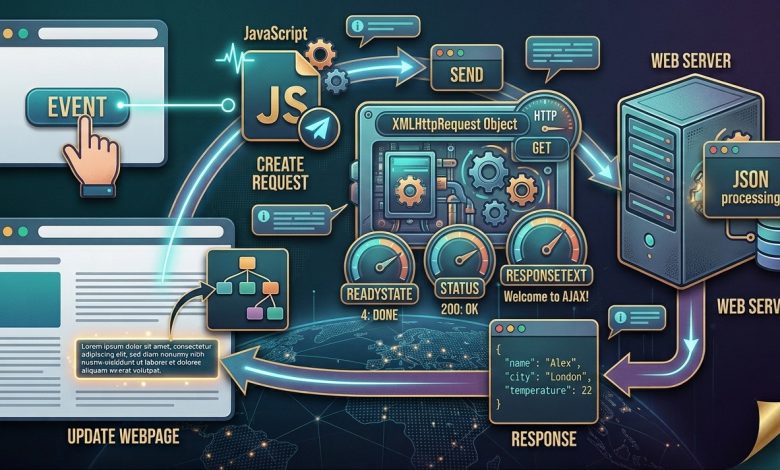
How AJAX Works: Step-by-Step Explanation
Understanding the AJAX workflow is easier when you break it into individual steps.
Suppose a user clicks a button to load information from a server.
Here is what happens behind the scenes.
Step 1: A User Event Occurs
The process begins when something happens on the webpage.
For example:
- A user clicks a button.
- A search field receives input.
- A form is submitted.
- A webpage finishes loading.
JavaScript detects the event and starts the appropriate operation.
Step 2: JavaScript Creates a Request
JavaScript prepares a request using XMLHttpRequest or the modern Fetch API.
The request contains information such as the destination URL, HTTP method, and any required data.
Step 3: The Browser Sends the Request
The browser sends the request to the specified server.
This communication happens asynchronously when the request is configured for asynchronous operation.
The user can continue interacting with the webpage while the request is being processed.
Step 4: The Server Processes the Request
The server receives the request and performs the required operation.
For example, it might:
- Read information from a database.
- Search for matching products.
- Calculate a value.
- Retrieve weather information.
- Validate submitted form data.
Step 5: The Server Sends a Response
After processing the request, the server returns a response.
The response might contain JSON, plain text, HTML, XML, or another supported data format.
Step 6: JavaScript Receives the Response
The browser makes the response available to JavaScript.
The application can then examine the response status and process the returned information.
Step 7: The Webpage Is Updated
Finally, JavaScript updates the relevant part of the webpage.
For example, it may display a new message, insert search results, or update a temperature value.
<text color=”secondary” size=”xs”>The complete AJAX communication process</text>
text
User interacts with webpage
          |
          v
JavaScript detects the event
          |
          v
XMLHttpRequest or Fetch API
          |
          v
Browser sends HTTP request
          |
          v
Web server processes request
          |
          v
Server returns a response
          |
          v
JavaScript processes the response
          |
          v
DOM updates the webpage
The most important advantage is that the entire webpage does not need to reload just because one section requires new information.
AJAX Example Explained: Your First AJAX Application
Let’s create a simple example similar to the traditional AJAX demonstration.
The goal is to display information from a text file when a visitor clicks a button.
Step 1: Create an HTML Page
Create a file named index.html.
Add the following code:
HTML
Wrap linesCopy codePreview
<!DOCTYPE html>
<html lang="en">

<head>
    <meta charset="UTF-8">
    <meta name="viewport" content="width=device-width, initial-scale=1.0">

    <title>My First AJAX Example</title>
</head>

<body>

    <h1>Learn AJAX</h1>

    <div id="demo">
        <p>Click the button to load new content.</p>
    </div>

    <button id="loadButton">Change Content</button>

    <script src="script.js"></script>

</body>

</html>
This HTML document contains a heading, a content section, and a button.
The demo element is where the server response will appear.
Step 2: Create a Text File
Create another file named ajax_info.txt.
Add the following content:
text
Welcome to AJAX!

AJAX allows webpages to communicate
with servers without reloading
the entire webpage.
This file will act as a simple server response.
Step 3: Create the JavaScript File
Create a file named script.js.
Add the following code:
javascript
function loadDoc() {

    const xhttp = new XMLHttpRequest();

    xhttp.onreadystatechange = function() {

        if (this.readyState === 4 && this.status === 200) {

            document.getElementById("demo").textContent =
                this.responseText;

        }

    };

    xhttp.open("GET", "ajax_info.txt", true);

    xhttp.send();

}

document.getElementById("loadButton").addEventListener(
    "click",
    loadDoc
);
Step 4: Run the Application
Place all three files inside the same project folder.
Your folder structure should look like this:
text
ajax-project/
│
├── index.html
├── script.js
└── ajax_info.txt
Run the project through a local development server.
For example, you can use the Live Server extension in Visual Studio Code.
Open the webpage and click the Change Content button.
The text file’s content should appear inside the demo section.
Important: AJAX requests should normally be tested through an HTTP server rather than opening the HTML file directly using a file:// URL. Browsers apply security restrictions to local file requests.
Understanding the XMLHttpRequest Object
The XMLHttpRequest object is one of the original browser APIs used for AJAX communication.
Although modern JavaScript developers often prefer Fetch for new projects, XMLHttpRequest remains important for understanding traditional AJAX applications and maintaining older code.
Let’s examine the main parts of the previous example.
1. Creating an XMLHttpRequest Object
javascript
const xhttp = new XMLHttpRequest();
This creates a new XMLHttpRequest instance.
The object provides methods and properties for configuring requests and handling server responses.
2. Using onreadystatechange
javascript
xhttp.onreadystatechange = function() {

    if (this.readyState === 4 && this.status === 200) {

        console.log(this.responseText);

    }

};
The readystatechange event occurs when the request’s readyState changes.
The readyState property represents the current state of the request.
| readyState | Meaning |
|---|---|
| 0 | UNSENT |
| 1 | OPENED |
| 2 | HEADERS_RECEIVED |
| 3 | LOADING |
| 4 | DONE |
When readyState becomes 4, the request has completed.
However, completion does not automatically mean success. That is why the HTTP status is also checked.
For example, status 200 indicates a successful HTTP response.
3. Opening the Request
javascript
xhttp.open("GET", "ajax_info.txt", true);
The open() method configures the request.
It accepts three important arguments:
- HTTP method.
- Request URL.
- Whether the request should be asynchronous.
The third argument is set to true, which means the request is asynchronous.
4. Sending the Request
javascript
xhttp.send();
The send() method sends the configured request to the server.
For a GET request, no request body is normally needed.
5. Reading the Response
javascript
this.responseText;
The responseText property contains the response returned by the server as text.
You can use it to display information or process the returned data.
For HTML or untrusted content, avoid inserting arbitrary server responses through innerHTML. Using textContent for plain text is a safer approach.
Understanding HTTP Status Codes in AJAX
When working with AJAX, understanding HTTP status codes is important.
They help developers determine whether a request succeeded or encountered a problem.
Some commonly encountered status codes include:
| Status Code | Meaning |
|---|---|
| 200 | OK |
| 201 | Created |
| 204 | No Content |
| 301 | Moved Permanently |
| 400 | Bad Request |
| 401 | Unauthorized |
| 403 | Forbidden |
| 404 | Not Found |
| 500 | Internal Server Error |
| 503 | Service Unavailable |
For example, if your AJAX request returns status 404, the requested resource could not be found.
If it returns 500, the server encountered an internal error.
Handling these situations properly makes your application more reliable.
Modern AJAX With JavaScript Fetch API
XMLHttpRequest is still supported, but modern JavaScript provides another approach called the Fetch API.
Fetch is a browser API designed to make HTTP requests using a Promise-based interface.
It is widely used in modern frontend development.
The syntax is generally easier to read, especially when working with JSON responses and asynchronous operations.
Basic Fetch Example
Let’s recreate our previous AJAX example using Fetch.
javascript
function loadDoc() {

    fetch("ajax_info.txt")

        .then(response => {

            if (!response.ok) {

                throw new Error("Unable to load the file");

            }

            return response.text();

        })

        .then(data => {

            document.getElementById("demo").textContent = data;

        })

        .catch(error => {

            document.getElementById("demo").textContent =
                "Something went wrong.";

            console.error(error);

        });

}
This example performs the same task as XMLHttpRequest.
However, Fetch uses Promises to manage asynchronous operations.
How Does Fetch Work?
1. fetch()
The fetch() function sends a request to the specified URL.
javascript
fetch("ajax_info.txt");
2. response.ok
This property indicates whether the HTTP response has a successful status code in the 200–299 range.
Remember that Fetch does not automatically reject its Promise for HTTP errors such as 404 or 500. You should check response.ok yourself.
3. response.text()
This method reads the response body as text.
It returns a Promise.
4. then()
The then() method processes the result of a completed asynchronous operation.
5. catch()
The catch() method handles rejected Promises, including network failures and errors deliberately thrown in the request chain.
Using Async and Await With Fetch
Another modern way to write AJAX requests is through async and await.
This syntax makes asynchronous JavaScript code easier to read because it resembles traditional step-by-step programming.
Example:
javascript
async function loadDoc() {

    try {

        const response = await fetch("ajax_info.txt");

        if (!response.ok) {

            throw new Error("Request failed");

        }

        const data = await response.text();

        document.getElementById("demo").textContent = data;

    } catch (error) {

        document.getElementById("demo").textContent =
            "Unable to load content.";

        console.error(error);

    }

}
The async keyword declares an asynchronous function.
The await keyword pauses execution inside that function until a Promise settles.
This does not freeze the browser or block the entire webpage.
For many modern AJAX applications, Fetch combined with async and await is a convenient starting point.
Working With JSON Data in AJAX
JSON is one of the most important concepts in modern web development.
It provides a structured way for frontend applications and backend servers to exchange information.
Unlike plain text, JSON can represent objects, arrays, numbers, strings, booleans, and null values.
For example:
json
{
    "name": "Sarah",
    "age": 25,
    "city": "New York",
    "profession": "Developer"
}
A server might return this information when an application requests user details.
Fetching JSON With JavaScript
Consider the following example:
javascript
async function loadUser() {

    try {

        const response = await fetch("/api/user");

        if (!response.ok) {

            throw new Error("Unable to retrieve user data");

        }

        const user = await response.json();

        document.getElementById("userName").textContent =
            user.name;

        document.getElementById("userCity").textContent =
            user.city;

    } catch (error) {

        console.error(error);

    }

}
The response.json() method reads the response body and parses it as JSON.
After parsing, JavaScript can access individual properties such as user.name and user.city.
The server must return a valid JSON response with an appropriate content type, typically application/json.
Why Is JSON So Popular?
JSON has several advantages:
- It is relatively lightweight.
- It is easy for developers to read.
- JavaScript supports it naturally.
- It works with many programming languages.
- It is widely used by REST APIs.
- It can represent structured application data.
For these reasons, JSON has become a common choice for communication between frontend applications and backend services.
Sending Data to a Server With AJAX
AJAX is not limited to receiving information.
It can also send data to a server.
For example, imagine that a website contains a contact form.
When someone submits the form, JavaScript can send the form information to a backend endpoint without refreshing the page.
Here is a simple example:
HTML
Wrap linesCopy codePreview
<form id="contactForm">

    <input
        type="text"
        id="name"
        placeholder="Your name"
        required
    >

    <input
        type="email"
        id="email"
        placeholder="Your email"
        required
    >

    <button type="submit">Send Message</button>

</form>

<p id="result"></p>
JavaScript:
javascript
document.getElementById("contactForm").addEventListener(
    "submit",
    async function(event) {

        event.preventDefault();

        const formData = {

            name: document.getElementById("name").value,

            email: document.getElementById("email").value

        };

        try {

            const response = await fetch("/api/contact", {

                method: "POST",

                headers: {

                    "Content-Type": "application/json"

                },

                body: JSON.stringify(formData)

            });

            if (!response.ok) {

                throw new Error("Form submission failed");

            }

            document.getElementById("result").textContent =
                "Your message was submitted successfully.";

        } catch (error) {

            document.getElementById("result").textContent =
                "Unable to submit your message.";

            console.error(error);

        }

    }
);
Understanding the Example
The submit event detects when the form is submitted.
The preventDefault() method prevents the browser’s normal form submission behavior.
JavaScript collects the user’s input and creates a JavaScript object.
The Fetch API then sends a POST request to the backend.
The JSON.stringify() method converts the JavaScript object into JSON text.
Finally, the server processes the information and returns a response.
This is a common pattern in modern web applications.
Remember that frontend validation is not enough for real applications. The backend must independently validate submitted information, protect against malicious input, and apply appropriate security controls.
Common Real-World Uses of AJAX
AJAX is used in many applications that people interact with every day.
Understanding these examples will help you recognize where asynchronous communication is useful.
1. Live Search
Search applications often request suggestions while a user types.
For example, when someone enters a product name, JavaScript can send the search query to a server and display matching products.
This improves the browsing experience because users do not need to submit a complete form or reload the page.
2. Weather Applications
Weather applications can request current conditions from external APIs.
Users enter a city name, and the application retrieves temperature, humidity, and weather descriptions.
Only the relevant weather information needs to be updated.
3. Social Media Platforms
Social applications frequently load comments, notifications, messages, and additional feed content asynchronously.
This helps keep the interface responsive.
4. E-Commerce Websites
Online stores use asynchronous requests for:
- Product searches.
- Shopping cart updates.
- Product filtering.
- Inventory information.
- Customer reviews.
- Checkout calculations.
For example, a user can add a product to a shopping cart while the website updates the cart count without reloading the entire page.
5. Administrative Dashboards
Business dashboards often request updated statistics from backend services.
AJAX allows charts, tables, and notification panels to refresh independently.
6. Online Forms
AJAX can help submit registration forms, feedback forms, and contact requests.
The application can display success or error messages without navigating away from the current page.
AJAX vs Traditional Page Reloading
Understanding the difference between traditional page loading and AJAX communication helps explain why asynchronous web development is important.
| Feature | Traditional Page Request | AJAX |
|---|---|---|
| Full page reload | Usually required for navigation or form submission | Not required for partial updates |
| Background requests | Not inherent to the traditional workflow | Supported |
| User experience | May interrupt the current view | Can provide smoother interactions |
| Data exchange | Commonly uses full document responses | Can exchange text, JSON, XML, and HTML |
| Page updates | Often replaces the document | Can update selected elements |
| Common usage | Traditional navigation and document requests | Dynamic content and interactive applications |
AJAX does not eliminate traditional page navigation.
Both approaches remain useful, and developers should choose based on the application’s requirements.
Common AJAX Errors and How to Fix Them
Beginners often encounter problems when creating their first AJAX applications.
Understanding common errors can save time and make debugging easier.
1. Incorrect URL
If the request URL is incorrect, the server may return a 404 response.
Check the endpoint carefully and verify that the requested file or API route exists.
2. Missing Backend Endpoint
JavaScript cannot create server-side functionality automatically.
If your code requests /api/user, your backend must provide an endpoint that handles that request.
3. CORS Errors
CORS stands for Cross-Origin Resource Sharing.
Browsers apply security restrictions when a webpage tries to access resources from a different origin.
For example, a webpage running on one domain may request information from an API hosted on another domain.
The API server must provide the appropriate CORS response headers when cross-origin access is permitted.
CORS should be configured on the server, not bypassed through insecure browser workarounds.
4. Invalid JSON
If a server returns malformed JSON, the response.json() method can fail.
Check the server response and make sure it contains valid JSON.
5. Network Problems
An unavailable server, disconnected network, or failed DNS lookup may prevent a request from completing.
Use browser developer tools to inspect the Network panel and identify what happened.
6. Forgetting to Handle Errors
A reliable application should not leave users wondering why information failed to load.
Use error handling to display clear messages and provide an appropriate next step.
7. Updating the Wrong HTML Element
Check that the element ID or selector exists and matches the actual HTML structure.
A small spelling mistake can prevent JavaScript from updating the intended section.
AJAX Security: Important Things Every Developer Should Know
Security is an essential part of modern AJAX development.
Because AJAX applications communicate with servers and often process user-generated information, developers must follow appropriate security practices.
Avoid Unsafe HTML Injection
Never assume that server responses or user input are safe to insert directly into HTML.
For displaying plain text, prefer:
javascript
element.textContent = serverResponse;
Avoid inserting untrusted data through innerHTML unless it has been appropriately sanitized and the operation is genuinely necessary.
Use HTTPS
Applications should use HTTPS to protect information while it travels between the browser and server.
This is particularly important when transmitting account information or personal data.
Validate Data on the Server
Client-side validation improves usability, but it is not a security boundary.
Always validate and authorize requests on the backend.
Protect Sensitive Operations
Operations involving accounts, payments, or personal information require appropriate authentication, authorization, and protection against cross-site request forgery where relevant.
Protect API Credentials
Do not place private API keys or secret credentials inside frontend JavaScript.
Anything delivered to a browser can potentially be inspected by users.
Keep sensitive credentials on the server.
How AI Is Changing AJAX and Modern Web Development
Artificial intelligence is creating new opportunities for developers to learn and build web applications.
AI coding assistants can explain unfamiliar JavaScript methods, generate starter code, help diagnose errors, and suggest improvements to existing AJAX applications.
For beginners, this can make the learning process more interactive.
However, understanding the fundamentals remains essential.
1. AI-Assisted AJAX Code Generation
Developers can describe a requirement in natural language and ask an AI assistant to generate a basic AJAX example.
For instance:
“Create a JavaScript function that retrieves JSON data from an API and displays the results in an HTML list.”
An AI assistant can suggest a Fetch implementation and explain how each part works.
2. Debugging AJAX Requests
AJAX problems can originate from many places.
An incorrect endpoint, invalid JSON, CORS configuration, or backend failure can all cause requests to behave unexpectedly.
AI tools can help interpret error messages and suggest areas to investigate.
3. Building AI-Powered Web Applications
AJAX and AI can work together in a practical application.
Consider an AI chatbot.
The frontend collects a user’s question and sends it to a backend endpoint through Fetch.
The backend communicates with an AI model, receives the generated answer, and returns the result to the browser.
JavaScript then updates the chat interface.
The workflow looks like this:
text
User enters a question
          |
          v
JavaScript sends AJAX request
          |
          v
Backend receives the question
          |
          v
Backend communicates with AI model
          |
          v
AI generates a response
          |
          v
Backend returns JSON
          |
          v
Frontend displays the answer
This approach can be used to build:
- AI chat applications.
- Document summarization tools.
- Smart search systems.
- Customer support assistants.
- AI-powered learning platforms.
- Intelligent content management tools.
The important security principle is to keep private AI service credentials on the backend rather than exposing them in browser code.
4. AI-Assisted API Integration
Developers often need to connect applications with external services.
AI tools can help explain API documentation, identify required parameters, and generate example requests.
However, developers should verify endpoint URLs, authentication requirements, rate limits, and response formats using the official API documentation.
5. Learning Through AI Feedback
Instead of simply copying code, beginners can ask AI to explain why a particular request works.
For example:
- Why does Fetch return a Promise?
- What is the difference between response.text() and response.json()?
- Why does a 404 response not automatically trigger catch()?
- What does readyState mean in XMLHttpRequest?
- How does CORS affect AJAX requests?
Asking these questions encourages deeper understanding.
Start Learning AJAX: A Practical Roadmap for Beginners
If you want to become a frontend developer or build modern web applications, AJAX is an important skill to learn.
You do not need to master every advanced concept immediately.
Follow this learning sequence to build your knowledge gradually.
Step 1: Learn HTML and CSS
Start by understanding how webpages are structured and styled.
Learn:
- HTML elements.
- Forms and buttons.
- IDs and classes.
- CSS selectors.
- Basic responsive design.
You need to understand webpage structure before learning how JavaScript changes it.
Step 2: Learn JavaScript Fundamentals
Focus on:
- Variables.
- Data types.
- Functions.
- Arrays and objects.
- Conditional statements.
- Loops.
- DOM manipulation.
- Event handling.
These concepts are the foundation of AJAX development.
Step 3: Understand HTTP Basics
Learn how browsers and servers communicate.
Understand:
- HTTP requests.
- HTTP responses.
- GET and POST methods.
- Status codes.
- Request headers.
- Response bodies.
- JSON.
These concepts will help you understand what happens behind the scenes when JavaScript communicates with a server.
Step 4: Practice XMLHttpRequest
Start with the traditional AJAX approach.
Create a small application that loads information from a text file.
Experiment with:
open()send()onreadystatechangereadyStatestatusresponseText
Understanding XMLHttpRequest will help you recognize older AJAX code in existing applications.
Step 5: Learn the Fetch API
Once you understand XMLHttpRequest, move to Fetch.
Practice:
- Sending GET requests.
- Sending POST requests.
- Reading text responses.
- Processing JSON.
- Using Promises.
- Using async and await.
- Handling errors.
Step 6: Work With Real APIs
Build applications that retrieve information from actual APIs.
Start with simple public data services and gradually explore more advanced APIs.
Always review their usage policies, authentication requirements, and rate limits.
Step 7: Build Your First AJAX Project
Choose a small project and complete it.
A weather application, live search tool, or simple contact form is a good starting point.
Once you can retrieve and display server data independently, you will have a practical understanding of AJAX.
Step 8: Explore AI Integration
After learning basic API communication, try connecting your application to an AI service through a secure backend.
This will help you understand how modern AI-powered applications communicate with external services.
Five Beginner-Friendly AJAX Projects
Practical projects are one of the best ways to develop confidence.
Here are five ideas you can build after learning the fundamentals.
Project 1: Dynamic Text Loader
Create a webpage with a button that retrieves information from a text file.
Skills: XMLHttpRequest, Fetch, DOM manipulation.
Project 2: Weather Application
Allow users to enter a city and retrieve weather information from a weather API.
Skills: Fetch, JSON, API integration, error handling.
Project 3: Live Search Application
Build a search box that retrieves matching information from a server as the user types.
Skills: Input events, AJAX, JSON, DOM manipulation.
Project 4: Contact Form
Create a form that sends user information to a backend without refreshing the webpage.
Skills: POST requests, JSON, validation, error handling.
Project 5: AI Chat Interface
Create a simple chat interface that sends questions to a backend connected to an AI model.
Skills: Fetch, asynchronous JavaScript, API integration, JSON, backend communication.
These projects will help you connect individual programming concepts to real applications.
Frequently Asked Questions About AJAX
1. What does AJAX stand for?
AJAX stands for Asynchronous JavaScript and XML. It is a technique for exchanging data between a browser and server without requiring a complete webpage reload.
2. Is AJAX a programming language?
No. AJAX is not a programming language. It is a web development technique that uses JavaScript and browser APIs to communicate with servers.
3. Does AJAX require XML?
No. Despite its name, AJAX does not require XML. Modern applications frequently use JSON or plain text for exchanging information.
4. What is XMLHttpRequest?
XMLHttpRequest is a browser API that allows JavaScript to send HTTP requests and receive responses from web servers.
5. What is the Fetch API?
The Fetch API is a modern JavaScript interface for making network requests. It uses Promises and works naturally with async and await.
6. What is the difference between AJAX and Fetch?
AJAX is the broader technique of asynchronous browser-server communication. Fetch is one modern browser API that can be used to implement AJAX.
7. Can AJAX update only part of a webpage?
Yes. JavaScript can use the server response to update selected DOM elements without reloading the entire document.
8. Why is JSON commonly used with AJAX?
JSON is lightweight, readable, and easy to process in JavaScript. It is also widely supported by backend frameworks and web APIs.
9. Does AJAX work without an internet connection?
AJAX can communicate with a local development server or a server on a local network without an internet connection. However, it needs an accessible server endpoint to retrieve or submit server data.
10. What is CORS in AJAX?
CORS stands for Cross-Origin Resource Sharing. It is a browser security mechanism that controls whether a webpage can access resources hosted on another origin.
11. Is XMLHttpRequest still supported?
Yes. XMLHttpRequest remains supported in modern browsers and is useful for maintaining older applications. Fetch is generally a convenient option for new projects.
12. Can AJAX be used with Python?
Yes. Python backend frameworks such as Django, Flask, and FastAPI can provide API endpoints that JavaScript accesses using AJAX or Fetch.
13. Can AJAX work with PHP and MySQL?
Yes. A JavaScript frontend can send requests to PHP endpoints, which can communicate with a MySQL database and return information as JSON.
14. Is AJAX important for AI development?
Yes. AJAX techniques are useful for sending questions to AI-powered backend services, retrieving generated responses, and updating interactive interfaces.
15. How long does it take to learn AJAX?
Someone who already understands HTML, CSS, and basic JavaScript can learn the fundamentals of AJAX within a few days of focused practice. Building more advanced applications requires additional experience with APIs, HTTP, backend development, and security.
Conclusion
AJAX has transformed the way modern websites communicate with servers.
Instead of requiring a complete webpage reload whenever information changes, developers can use asynchronous JavaScript requests to retrieve or submit data and update individual sections of a webpage.
The traditional XMLHttpRequest object introduced many developers to this approach, while the modern Fetch API provides a cleaner and more convenient way to handle network communication.
JSON has also become an important part of modern AJAX development because it makes structured data exchange simple and efficient.
From live search and weather applications to online forms, shopping carts, dashboards, and AI-powered chat interfaces, asynchronous communication is an essential part of interactive web development.
If you are just starting, begin with a simple HTML page and learn how to load information from a text file. Then explore XMLHttpRequest, move to Fetch, practice working with JSON, and gradually build applications that communicate with real APIs.
You can also use AI-powered coding assistants to explain unfamiliar concepts, generate practice exercises, and help debug your code.
But remember: understanding how requests, responses, HTTP methods, and DOM updates work is more valuable than simply copying an example.
Start learning AJAX today, experiment with practical projects, and take your first steps toward building modern, responsive, and AI-powered web applications.